BPro Compact Scale Uživatelský manuál
Procházejte online nebo si stáhněte Uživatelský manuál pro Kuchyňské váhy BPro Compact Scale. Compact Scale - Mettler Toledo Uživatelská příručka
- Strana / 74
- Tabulka s obsahem
- KNIHY

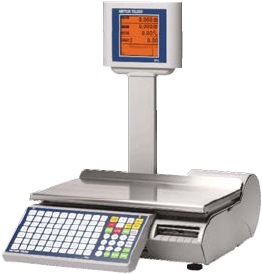
- Compact Scale 1
- Publication Revision 3
- PRECAUTIONS 4
- CONTENTS 5
- 1 Introduction 7
- Specifications 8
- Power Switch 9
- Network Connection 9
- Leveling the Scale 10
- 2 Operating Instructions 11
- Keyboard 12
- Special functions 13
- EMPTY KEYS = SPACE KEYS 14
- 9 8 14
- Text Editing Window 15
- Main Screen 16
- PLU Pricing Modes 17
- By-Weight PLU 17
- By-Count PLU 17
- Standard Pack PLU 17
- PLU Screens 18
- Calling Up PLUs 19
- Printing Labels 20
- Temporary Overrides 21
- 3 Configuration 23
- Program Menu 24
- Database 25
- Quick PLU Change 26
- Database PLU 27
- Database Extra Text 29
- Database Nutrifacts 30
- Database Special 31
- Message 31
- Database COOL Text 31
- Database Traceability 32
- Database Delete 33
- Clone Scale 34
- Print Reports 34
- Service Mode 34
- Password Setup 34
- Unit Setup 35
- PLU Auto Call 37
- PLU Display Options 37
- Active Tare 38
- PLU Display Align 38
- PLU Presets 39
- Default Label Format 39
- Delete Custom Formats 40
- Serial Port 40
- Network Address 41
- Wireless Configuration 42
- Store Information 42
- Store Logo 43
- Scale Number 43
- Marquee 44
- Barcode Settings 45
- PLU Settings 45
- Set Time and Date 46
- Assign Group Names 46
- Enable Function Keys 47
- Language 47
- User Define 48
- Sales Online 49
- Process Mode 50
- 4 Labels 51
- Loading Labels 53
- Default Label Styles 55
- Label Requirements 56
- Label Paper 56
- Label Stripping 57
- Finished Label Roll 57
- Requirements 57
- SLITTING 58
- WINDING 58
- LABEL CURL 58
- SPLICING 59
- Finished Label and Roll 60
- Dimensional 60
- Preprinted Labels 62
- Special Shaped Labels 64
- Definition of 64
- Transmission Optical 64
- Density 64
- Label and Liner Optical 65
- Black Stripe Optical 65
- 5 Maintenance 67
- WARNING 68
- 6 Appendix 71
- METTLER TOLEDO 74
Shrnutí obsahu
bPro® Compact Scale User’s Guide 64067202.R1
METTLER TOLEDO bPro User's Guide 1-4 Leveling the Scale Adjust the four feet until the bubble, located under the scale platter, is in the c
Chapter 2: Operating Instructions Machine Configuration 2-1 2 Operating Instructions Machine Configuration The customer/operator display of the
METTLER TOLEDO bPro User's Guide 2-2 Keyboard The keyboard consists of a membrane switch-pad and an overlay that provides tactile feedback an
Chapter 2: Operating Instructions Keyboard 2-3Special functions Pressing PRINT when there is no weight on the platter will advance a blank label. Pr
METTLER TOLEDO bPro User's Guide 2-4 Text Editing Mode When editing text fields, the user will find the bPro very flexible. The buttons do
Chapter 2: Operating Instructions Text Editing Mode 2-5Text Editing Window There are up to 15 lines per Text item. There can be multiple sentences p
METTLER TOLEDO bPro User's Guide 2-6 Main Screen Initially, the bPro boots to a screen that looks much like the one pictured below. This home
Chapter 2: Operating Instructions PLU Pricing Modes 2-7 PLU Pricing Modes PLU is an abbreviation for Price Look Up. The PLU is a reference number as
METTLER TOLEDO bPro User's Guide 2-8 PLU Screens The PLU screen will vary based on the type of PLU that is being displayed: By Weight, By Cou
Chapter 2: Operating Instructions Calling Up PLUs 2-9 Calling Up PLUs When the bPro® is in Service Mode, the screen will display the Main PLU manage
©Mettler-Toledo, LLC 2012 No part of this manual may be reproduced or transmitted
METTLER TOLEDO bPro User's Guide 2-10 Printing Labels Once the PLU has been called up, make any needed changes, and then press the Print butt
Chapter 2: Operating Instructions Temporary Overrides 2-11 Temporary Overrides Temporary Overrides are certain values can be adjusted for the curren
METTLER TOLEDO bPro User's Guide 2-12 For your notes
Chapter 3: Configuration Introduction 3-1 3 Configuration Introduction Setup for the bPro® is controlled from the Configuration screen. This is
METTLER TOLEDO bPro® User's Guide 3-2 Program Menu Database Database Traceability Enable Function Keys Print Reports Quick PLU Change Ed
Chapter 3: Configuration Database 3-3 Database This path takes the user to the Database cascade where he or she may make changes to the individual P
METTLER TOLEDO bPro® User's Guide 3-4 Quick PLU Change The Quick PLU Change menu is meant to allow for modification of the selected PLU with
Chapter 3: Configuration Database 3-5Quick Label Change Change the selected PLU’s first and second label printing characteristics Quick Special Messa
METTLER TOLEDO bPro® User's Guide 3-6 Edit PLU Via the Edit PLU menu, a user may completely redefine a product entry. Listed in a continuous
Chapter 3: Configuration Database 3-7 Database Extra Text The Database Extra Text menu is responsible for the modification of existing extra text ent
Publication Revision History Part Number Date Revisions 64067202 12/08 New manual 64067202 04/10 Revisions to chapters 1, 2, 3, 5 and 6 Tradem
METTLER TOLEDO bPro® User's Guide 3-8 Database Nutrifacts In order to best use the Database Nutrifacts menu, the user should be familiar with
Chapter 3: Configuration Database 3-9 Database Special Message The Database Special Message menu allows the user to alter, copy or list-print the spe
METTLER TOLEDO bPro® User's Guide 3-10 Database Traceability Edit Lot Number; Edit Process Date; Edit Supplier Information Upon entering any
Chapter 3: Configuration Database 3-11 Database Delete As one might expect, this menu is used to permanently delete entries from the unit database. C
METTLER TOLEDO bPro® User's Guide 3-12 Clone Scale DISCLAIMER: The Clone Scale function is meant to be used by trained Mettler-Toledo techni
Chapter 3: Configuration Unit Setup 3-13 Unit Setup The Unit Setup menu contains many of the options necessary to tune the bPro unit to a user’s spe
METTLER TOLEDO bPro® User's Guide 3-14 Store Information Edit the store info text field. This data is printed on the label in the field of the
Chapter 3: Configuration Unit Setup 3-15 PLU Auto Call The PLU Auto Call menu allows the user to determine how many keystrokes will be required to be
METTLER TOLEDO bPro® User's Guide 3-16 Active Tare Selects whether Tare 1 or Tare 2 will be used when a PLU is called. PLU Display Align S
Chapter 3: Configuration Unit Setup 3-17 PLU Presets The PLU Presets menu allows the user to assign PLUs to the left-hand keys on the bPro keypad. I
PRECAUTIONS WARNING ONLY PERMIT QUALIFIED PERSONNEL TO SERVICE THIS EQUIPMENT. EXERCISE CARE WHEN MAKING CHECKS, TESTS AND ADJUSTMENTS THAT MUS
METTLER TOLEDO bPro® User's Guide 3-18 Delete Custom Formats This option allows you to delete the custom label formats in the database. Selec
Chapter 3: Configuration Unit Setup 3-19 Network Address To check the various address specifics of the unit, a user needs simply go to the Network Ad
METTLER TOLEDO bPro® User's Guide 3-20 Wireless Configuration This section allows you to set up your wireless device via a few simple switche
Chapter 3: Configuration Unit Setup 3-21 Store Logo To select a Store Logo that will print on many of the unit’s labels, a user must simply make a se
METTLER TOLEDO bPro® User's Guide 3-22 Marquee A user may enable or modify the marquee features of the bPro by accessing the Marquee menu in
Chapter 3: Configuration Unit Setup 3-23 Barcode Settings In the Barcode Settings menu, the user can not only select the format of the barcodes that
METTLER TOLEDO bPro® User's Guide 3-24 Set Time and Date As its name suggests, the Set Time and Date menu deals with synchronizing the scale
Chapter 3: Configuration Unit Setup 3-25 Enable Function Keys This menu allows the user to set the functionality for each of the unit’s keys. The ind
METTLER TOLEDO bPro® User's Guide 3-26 User Define The User Define menu allows various parameters to be changed that dictate the appearance o
Chapter 3: Configuration Unit Setup 3-27 Sales Online SALES ONLINE is a scale application that allows floating vendor functionality where multiple PL
CONTENTS 1 Introduction ... 1-1 General ...
METTLER TOLEDO bPro® User's Guide 3-28 Process Mode The Process Mode menu allows the user to designate PLUs as certain types, thus assigning
Chapter 4: Labels Loading Labels 4-1 4 Labels Loading Labels The bPro label loading procedure is a simple one and can be worked through by any
METTLER TOLEDO bPro® User's Guide 4-2 3.) Unlock the printhead by pressing on the green lock-lever. 4.) Install the label roll on the supply
Chapter 4: Labels Loading Labels 4-3 5.) Pull the liner back and route it under the bottom guide. Gently pull out on the green knob on the liner take
METTLER TOLEDO bPro® User's Guide 4-4 7.) Press down on the printhead latch until it locks down. 8.) When the printer has been loaded with pr
Chapter 4: Labels Default Label Styles 4-5 Default Label Styles Below is a list of default label styles broken into their default numbers (left colu
METTLER TOLEDO bPro® User's Guide 4-6 These t Label Requirements These thermal labels requirements apply to the BPro® printers. This section
Chapter 4: Labels Label Requirements 4-7TOTAL THICKNESS LABEL + ADHESIVE + LINER Total Thickness Label + Adhesive + Liner: 159 ± 17 μ METER (0.0056 t
METTLER TOLEDO bPro® User's Guide 4-8 SLITTING The release liner must be slit cleanly and be made free of edge slivers and dust by vacuuming o
Chapter 4: Labels Label Requirements 4-9 SPLICING Each roll may contain one splice on non-label side of liner using 0.002 inch maximum thickness tape
Wireless Configuration ... 3-20 Store Information
METTLER TOLEDO bPro® User's Guide 4-10 Finished Label and Roll Dimensional Requirements A B C A FD E G H It
Chapter 4: Labels Label Requirements 4-11Typical Dimensions – 2” Label Roll 0.9 min [23] 12 max [300] NOTE: Dimensions in
METTLER TOLEDO bPro® User's Guide 4-12 Preprinted Labels To ensure trouble free operation of the printer gap sensor, and to achieve normal p
Chapter 4: Labels Preprinted Labels 4-13 3. If an optical density of at least 2.3 cannot be achieved in the black stripe on the back of the liner. T
METTLER TOLEDO bPro® User's Guide 4-14 Special Shaped Labels Labels with shapes other than rectangular will cause gap detection errors if th
Chapter 4: Labels Label and Liner Optical Density 4-15 Label and Liner Optical Density If liner paper transmits 2% of the light which is incident on
METTLER TOLEDO bPro® User's Guide 4-16 For your notes
Chapter 5: Maintenance Unit Cleaning 5-1 5 Maintenance Unit Cleaning WARNING Disconnect all power to this unit before installing, servicing, c
METTLER TOLEDO bPro® User's Guide 5-2 Printer Cleaning Clean the printhead anytime you notice the print quality has degraded. Slide the pri
Chapter 5: Maintenance Printer Cleaning 5-3When doing regular maintenance, or when changing a label roll, check for any buildup on the Printer Roller
Chapter 1: Introduction 1-1 1 Introduction General Thank you for purchasing the feature rich bPro® scale. METTLER TOLEDO designed the bPro seri
METTLER TOLEDO bPro® User's Guide 5-4 For your notes
Chapter 6: Appendix Define barcode Digits 6-1 6 Appendix Define barcode Digits Barcode Identification Symbols A = Item Number 4 – 12 figures B
METTLER TOLEDO bPro® User's Guide 6-2 For your notes
METTLER TOLEDO 1900 Polaris Parkway Columbus, Ohio 43240 www.mt.com METTLER TOLEDO® and bPro® are regist
METTLER TOLEDO bPro User's Guide 1-2 Specifications Description Specifications – bPro Capacity x Division 6 x 0.002 kg / 15 x 0.005 kg 1
Chapter 1: Introduction 1-3 Power Switch The power switch and power cord jack are located under the keypad at the left front of the scale. Press |
Další dokumenty pro Kuchyňské váhy BPro Compact Scale

Související produkty a manuály pro Kuchyňské váhy BPro Compact Scale
 (119 stránky)
© 2020, manymanuals.cz. Všechna práva vyhrazena. | 0.046 s |
 Manymanuals.com
 Manymanuals.de
 Manymanuals.fr
 Manymanuals.it
 Manymanuals.pl
 Manymanuals.cz
 Manymanuals.es
 Manymanuals-pt.com
Komentáře k této Příručce